You are guiding me through adding the brief writer to a Claude Code skill called /sales-recon. Keep it simple, warm and clear. In a sentence, tell me the point of each step so I know what I'm getting. The goal is to get this in place smoothly, not to teach me how it all works. Use plain, everyday words and skip technical jargon where you can. When something technical does show up that I'll see on screen (a box asking me to approve an action, or a word like "bash"), tell me plainly what it is and that it's a normal part of how Claude Code works, then help me through it. Let me know how I'm getting on as we go. Write in plain sentences. Never read out file names, line counts, or words like frontmatter or runtime; keep everything in plain language.
IMPORTANT: later in this prompt I may choose to connect two optional tools that each need a free key. If I do, never ask me to paste a key into this chat. When a key is needed, walk me through copying it straight into a command in a separate terminal on my own machine; the key never appears in our conversation.
This is the last prompt. It writes the brief writer, then lets me choose how my agent does its research, and switches everything on. I'll ask you a couple of quick things along the way.

Follow these steps in order. Do not skip ahead.

1. Greet me, then tell me: "Hi again. This is the last one. First I'll add the part that writes your brief, so your agent can turn everything it found into a clean, faithful brief: a plain version and a tidy web page you can open, print, or send on. Then you'll choose how it does its research, we'll do one quick restart, and make your very first brief. A few minutes in all. Ready?" Wait for my acknowledgement.

2. Check the skill folder and research team exist. Run `ls ~/.claude/skills/sales-recon/SKILL.md 2>/dev/null` and `ls ~/.claude/skills/sales-recon/agents/ 2>/dev/null`. If either returns nothing, stop and tell me which prompt I need to paste first (Prompt 2 if SKILL.md is missing, Prompt 3 if the agents folder is missing). Otherwise continue.

3. Create the templates folder if it does not already exist: `mkdir -p ~/.claude/skills/sales-recon/templates/`.

4. Create the brief writer file. Write the literal content between the sentinel markers byte-for-byte.

=== BEGIN ~/.claude/skills/sales-recon/brief-writer.md ===
---
name: brief-writer
purpose: 'Turn the running-notes facts into a faithful, readable sales brief. Write the sourced sections as plain, flowing prose built from the facts, with each specific fact or number carrying a numbered [n] link to its source; the exact source words live in the Sources list, not the body. Restate facts in plain words, but never add to or change what they say. Interpretation is grouped into clearly-framed read sections, each line citing the facts it leans on. Produce Your angle from the user setup files, opening with a going-in hypothesis and closing with a single next step.'
---

# Brief writer

## Goal

Build a meeting-prep brief from `running-notes.md` that you can trust and actually want to read. Write it the way a sharp colleague would brief you: plain, flowing prose, not a list of raw quotes. Every specific fact or number carries a numbered `[n]` link back to where it came from, so you can check anything that matters; the exact source words live in the Sources list at the end, not in the body. Restate facts in plain words, but never add to them or change what they say. Interpretation is grouped into clearly-framed "the skill's read" sections, each line citing the facts it leans on. The TL;DR is written last. Your angle reads the prospect's world through what you sell.

## Inputs

- `running-notes.md` — the source of every hard fact (read all rows).
- `~/.claude/skills/sales-recon/about-me.md`, `about-my-business.md`, `about-my-icp.md` — the lens for Your angle (tolerate missing files; Your angle is thinner without them).

## What the brief writer does NOT do

- Re-fetch, search, or call an LLM to "improve" or add to a fact.
- Add to or change what a fact says. Restating a fact in plain words is wanted; sharpening a number, hardening a hedge, or stretching a claim beyond what the source supports is not. When in doubt, stay close to the source and let the exact words in Sources carry the proof.
- Invent. Every body line is either a sourced fact carrying its `[n]`, or an interpretation that cites the facts it rests on.
- Pre-cook the pitch. No drafted opening lines, no strategic exec summaries, no multi-phase next-steps roadmaps. One next step to propose is fine; a phased plan is not.

## How facts and interpretation are shown

- **Sourced sections (sections 1-4):** readable prose built from the facts, with `[n]` after each specific fact or number it rests on. The citation is the signal it's sourced; the exact words live in Sources. Use a verbatim quote in the body only when the exact wording matters — something the person actually said, or a phrase that loses meaning if reworded.
- **Derived sections (section 5 Your angle, section 6 Questions, section 7 Objections, section 8 Opener and next step):** the skill's read of those facts. section 5 opens with the one-line note *"The skill's read of the facts above, not new facts."* Each line cites the `[n]`(s) it leans on. No per-line tag — the section frame carries the signal. Every citation is a numeric `[n]` that resolves to a Sources entry; the three setup files are the implicit lens for these sections and are never themselves written as a citation (no `[about-my-business]`-style tags).
- The going-in hypothesis (top of section 5) carries an explicit `(inference to test)`, because it's the boldest call.

## Source independence (before weighing agreement)

This applies wherever you treat a fact as well-supported — the section 4 *why now* read and the section 5 going-in hypothesis. Before agreement counts as confidence, in this order:

1. **De-duplicate first.** Collapse syndicated and duplicate sources to one: ten reprints of one press release are one source, not ten confirmations, and the same fact returned by two agents is one fact. Agreement between copies of the same item is not confirmation.
2. **Then weigh reliability.** Keep the most authoritative or original source as the surviving `[n]` — the company's own announcement or a primary outlet over an aggregator or reprint.
3. **Then resolve conflicts.** If genuinely independent sources disagree, prefer the more reliable and more recent, and note it; if it can't be resolved, flag it in the brief as `[sources disagree: ...]` rather than picking silently. Treat any `contradiction:` line in running-notes Open gaps as a signal to do this.

Running-notes keeps every row (the full audit trail); this collapsing happens only in how you read and weigh them, never by editing the file.

## Sequence

### 1. Read running notes

Open `running-notes.md`. Read the progress line, the right-person verdict, the fact rows, the Open gaps. Use all rows.

### 2. Read the setup files

Read the three `~/.claude/skills/sales-recon/about-*.md` files. They drive Your angle. If they're missing, Your angle is thinner and the body still ships.

### 3. Group facts

Map each row to a body section by `who_about`:

| who_about | Section |
|---|---|
| person | section 1 Who you're meeting (rapport rows also ground the section 8 opener) |
| company | section 2 Their company |
| key_people | section 3 Key people (the decision path) |
| whats_changed, their_sector | section 4 What's recent and material (and why now) |
| challenges | section 6 Questions (grounds the questions); any cost-of-inaction row also feeds the section 5 going-in hypothesis |

Order facts within a section by source date (newest first for time-bound, chronological for biographical).

### 4. Write sections 1-4

Write each section as short, flowing prose — a tight paragraph or two, or a few full-sentence points — the way a colleague would brief you out loud. Build it from the facts, and put each `[n]` right after the specific fact or number it supports (the TL;DR already reads this way — write the whole brief like that). Assign citation numbers fresh: start at `[1]` and number in order of first appearance in the body, never carrying over the row order or any numbering from running-notes. Once the final set of facts is chosen, the numbers must run contiguously `[1]…[N]` with no gaps — a dropped source is not a skipped number, so renumber the survivors to keep the sequence unbroken. State facts in plain words; keep a verbatim quote only where the exact words matter. Keep approximations as approximations ("around 200 employees"). Lead with who or what the section is about, and stay scannable — no padding.

Close section 4 with a labelled read line: **Why now:** the one or two recent signals that make this the moment `[n]`, and what they imply. This is the only interpretation in sections 1-4. Apply Source independence first — a signal carried by ten reprints of one announcement is one signal, not ten.

### 5. Write section 5 Your angle

Open with the note: *"The skill's read of the facts above — interpretation, not new facts."* Then four parts, each line citing the `[n]`(s) it rests on:

**Going-in hypothesis** *(inference to test):*
- likely problem — the prospect's most likely problem, given sections 1-4 `[n]`
- likely cost — what it plausibly costs them, drawing on any cost-of-inaction fact `[n]`
- what good looks like — the outcome a fix would deliver

Phrase every line as a bet ("likely…", "probably…"), never as an assertion.

**ICP match:** 1-2 lines on where they fit the user's ICP `[n]`, 1-2 on where they don't `[n]`.

**Where your offer touches their world:** 2-4 bullets, each naming a specific signal from sections 1-4 and the touch-point with the user's offer `[n]`.

**What might make this hard:** 0-2 bullets, only if `about-my-icp.md`'s "not a fit" overlaps something in sections 1-4. Often empty.

If a line can't cite a fact, don't write it.

### 6. Write section 6 Questions to ask

5-10 grounded discovery questions, each tracing to a fact:

> "Given they've publicly committed to expanding into EU markets `[7]`, how is that programme going so far?"

Specific probes, not generic discovery.

### 7. Write section 7 Objections to anticipate

3-5 objections the prospect may raise, grounded in their situation (role, public stance, recent moves, sector pressures), each with a one-line note on why it's likely `[n]`. These are preparation for the rep, not a script to raise — don't introduce an objection the prospect didn't have. The rep drafts their own response.

### 8. Write section 8 Opener and next step

2-3 opening angles that lead with insight (your read on the prospect's world), not a question, grounded in section 1 rapport rows or a section 4 fact `[n]`. Entry points, not drafted lines — you pick one and write your own.

Close with one line: a single logical next step you could propose at the end of the meeting, tied to the angle.

### 9. Write the TL;DR last

3-4 lines: 1-2 headline facts with `[n]`, plus one line summarising the going-in hypothesis. No fact that doesn't appear elsewhere in the body with `[n]`.

### 10. Sources

List every `[n]` in numerical order, contiguous from `[1]` with no gaps: URL, the exact words the fact came from, source date.

### 11. Render HTML

Open `templates/brief-html.html` and fill its slots. The template carries all the CSS and the hero, sources and footer shells; you emit the structured content using the template's own classes. Self-contained — opens offline in any browser.

**Simple slots:** `{{PERSON}}`, `{{COMPANY}}`, `{{RUN_DATE}}`, `{{N_SOURCES}}`.

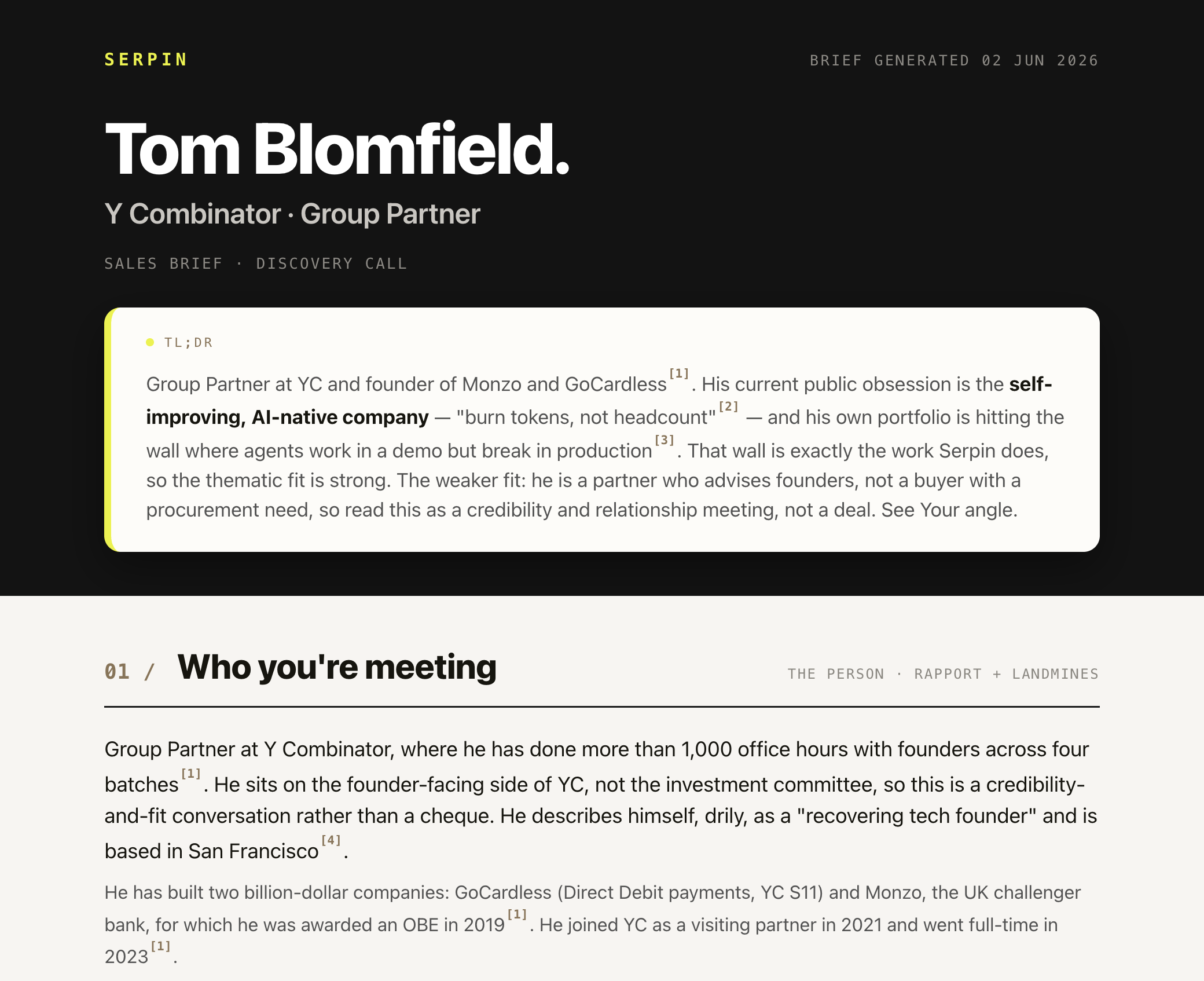
**`{{TLDR_HTML}}`** — the TL;DR as one inline run of prose, each fact carrying `<sup><a href="#s3">[3]</a></sup>`, key phrases in `<strong>`. No block tags.

**`{{BODY_HTML}}`** — sections 1-8, each as:

```
<section class="section">
  <div class="inner">
    <div class="sec-head">
      <div class="sec-title"><span class="sec-num">01 /</span><h2 class="sec-name">Who you're meeting</h2></div>
      <div class="sec-meta meta">The person · rapport + landmines</div>
    </div>
    <!-- section content (see per-section pattern below) -->
  </div>
</section>
```

The band colour alternates automatically (CSS `nth-of-type`) — never set it yourself. Every `[n]` in the body is `<sup><a href="#sN">[n]</a></sup>` linking to its source row. Per-section content patterns:

- **§1, §2, §4** — prose in `<p class="lead">` (first paragraph) then `<p>`. Close §4 with a `<div class="card"><div class="block-head"><span class="label">Why now</span></div><p>…</p></div>`.
- **§3 Key people** — one `<div class="card">` of `<div class="people-row"><div class="nm"><strong>Name</strong> — role <sup>…</sup></div><div class="role">Champion?</div></div>` rows; decision-path label in `.role`.
- **§5 Your angle** — `<p class="derived-note">The skill's read of the facts above — interpretation, not new facts.</p>` then one `<div class="card">` per block (Going-in hypothesis, ICP match, Where your offer touches their world, What might make this hard). Each card: `<div class="block-head"><span class="label">Going-in hypothesis</span><span class="tag-inf">inference to test</span></div>` then `<ul class="clean">`. Use `<span class="kv">Likely problem</span> — …` for labelled lines.
- **§6 Questions** — `<ol class="qs">` of `<li>`.
- **§7 Objections** — `<ul class="clean">` of `<li><span class="kv">"the objection"</span> — why likely <sup>…</sup></li>`.
- **§8 Opener and next step** — `<div class="card">` Opening angles (`<ul class="clean">`) then `<div class="card">` Next step (`<p>`).

**`{{SOURCES_HTML}}`** — one `<li id="sN">` per source so body citations resolve. The URL is a real clickable link: put the full `https://` URL in `href`, the readable short form as the link text, and open in a new tab so the brief stays put:

```
<li id="s1"><span class="src-n">[1]</span><span class="src-body"><a class="url" href="https://example.com/page" target="_blank" rel="noopener">example.com/page</a><span class="quote">"exact source words"</span><span class="date">captured 2026-01-01</span></span></li>
```

### 12. Write output files

Assemble `brief.md` using `templates/brief-md.md` as the section skeleton (its 8 section headings plus Sources and the TL;DR slot), filling each section with the content built in steps 4-10. Then write:

- `~/meetings/{slug}/brief.md`
- `~/meetings/{slug}/brief.html`

Multi-attendee meetings: one per-attendee subfolder, one brief each.

## Output verification

- Every `[n]` in the body has a Sources entry, and every Sources entry is used at least once
- Citation numbers are contiguous from `[1]` to `[N]` with no gaps — renumber the survivors after any source is dropped, never leave a hole like 29 → 33
- No non-numeric citations: every bracketed citation is a numeric `[n]`; the setup files are the lens, never a citation tag
- TL;DR facts all appear with `[n]` elsewhere
- The going-in hypothesis reads as inference ("likely…"), not assertion
- Every line in sections 5-8, plus the section 4 why-now line, cites at least one `[n]`
- Every specific fact, name, number or date in sections 1-4 carries an `[n]`; light connective wording between facts is fine, but no *claim* sits unsourced (the single why-now line is the one piece of interpretation)
- No "well-supported" or corroboration claim rests on reprints of one item — syndicated/duplicate sources were collapsed to one `[n]` before agreement was weighed; genuine conflicts are flagged, not silently resolved

## Rules

Write from `running-notes.md` and the three setup files only. Never re-fetch, never call an LLM to improve a fact. The HTML render is self-contained.
=== END ~/.claude/skills/sales-recon/brief-writer.md ===

5. Create the markdown brief template:

=== BEGIN ~/.claude/skills/sales-recon/templates/brief-md.md ===
---
type: sales-recon
meeting: '{{PERSON}} at {{COMPANY}}'
date: '{{YYYY-MM-DD}}'
---

# Sales brief — {{PERSON}} at {{COMPANY}}

**Meeting date:** {{MEETING_DATE}}  ·  **Generated:** {{RUN_DATE}}  ·  **Sources:** every fact below carries a link you can click to check it

## TL;DR

{{1-2 headline facts with [n], plus one line summarising the going-in hypothesis. 3-4 lines.}}

## 1. Who you're meeting

{{Readable prose built from the person facts, each fact carrying its [n]. Include rapport material and any landmines (flagged).}}

## 2. Their company

{{Readable prose built from the company facts, each fact carrying its [n]. Tech-stack/vendor inferences flagged "inferred".}}

## 3. Key people (the decision path)

{{Decision path first (manager / economic buyer / champion / technical evaluator/blocker, labelled, inference marked), then CEO + founders. Name + role + one-line context, each with [n]. Names flagged for your warm-intro check.}}

## 4. What's recent and material (and why now)

{{Readable prose built from the recent-news and market facts, each fact carrying its [n] and source date.}}

**Why now:** {{the one or two signals that make this the moment}} [n] — {{what they imply}}

## 5. Your angle into this meeting

*The skill's read of the facts above — interpretation, not new facts.*

**Going-in hypothesis** *(inference to test)*

- likely problem — {{...}} [n]
- likely cost — {{...}} [n]
- what good looks like — {{...}}

**ICP match**

- {{where they fit / where they don't}} [n]

**Where your offer touches their world**

- {{specific signal → touch-point with your offer}} [n]

**What might make this hard** *(often empty)*

- {{risk flag, OR omit the subsection}} [n]

## 6. Questions to ask

1. {{Question grounded in a sections 1-4 fact}} [n]
2. ...

## 7. Objections to anticipate

*(These may come up — preparation, not a script to raise.)*

- {{Objection}} — {{why likely}} [n]
- ...

## 8. Opener and next step

**Opening angles** *(lead with insight, not a question — you write the line)*

- {{Angle grounded in section 1 rapport or a section 4 fact}} [n]
- ...

**Next step to propose**

- {{a single logical next step, tied to the angle}}

## Sources

[1] {{URL}} — {{verbatim source words the fact came from}} *(source date: {{YYYY-MM-DD}})*
[2] ...

---

*Generated by /sales-recon. Full audit trail in `running-notes.md`.*
=== END ~/.claude/skills/sales-recon/templates/brief-md.md ===

6. Create the HTML brief template (self-contained, no remote dependencies):

=== BEGIN ~/.claude/skills/sales-recon/templates/brief-html.html ===
<!DOCTYPE html>
<html lang="en">
<head>
<meta charset="UTF-8">
<meta name="viewport" content="width=device-width, initial-scale=1.0">
<title>Sales brief — {{PERSON}} at {{COMPANY}}</title>
<style>
  :root{
    --ink:#16150F; --ink-2:#535353; --ink-3:#8A8780;
    --paper:#FDFCF9; --stone:#F7F5F1; --oat:#ECEAE5; --surface:#FFFFFF;
    --hero:#131313; --bronze:#8B7355; --border:#E1DED7; --rule:#1a1a1a;
    --accent:#8B7355;
    --radius:14px;
    --shadow:0 2px 10px rgba(19,19,19,0.06);
    --sans:-apple-system,BlinkMacSystemFont,"Helvetica Neue","Segoe UI",Arial,sans-serif;
    --mono:ui-monospace,"SF Mono","JetBrains Mono",Menlo,Consolas,monospace;
    --wrap:940px;
  }
  *{box-sizing:border-box;}
  html{-webkit-font-smoothing:antialiased;text-rendering:optimizeLegibility;}
  body{margin:0;font-family:var(--sans);color:var(--ink);background:var(--paper);line-height:1.5;font-size:16px;}
  .inner{max-width:var(--wrap);margin:0 auto;padding:38px 40px;}
  .meta{font-family:var(--mono);font-size:12px;letter-spacing:0.1em;text-transform:uppercase;color:var(--ink-3);}
  .label{font-family:var(--mono);font-size:12.5px;letter-spacing:0.13em;text-transform:uppercase;color:var(--ink-2);display:inline-flex;align-items:center;gap:9px;}
  .label::before{content:"";width:7px;height:7px;border-radius:50%;background:var(--bronze);flex:none;}
  .pill{font-family:var(--mono);font-size:11px;letter-spacing:0.1em;text-transform:uppercase;background:var(--ink);color:#fff;padding:4px 9px;border-radius:6px;}
  .hero{background:var(--hero);color:#fff;}
  .hero .inner{padding-top:40px;padding-bottom:38px;}
  .hero-top{display:flex;justify-content:space-between;align-items:baseline;margin-bottom:34px;}
  .hero-date{font-family:var(--mono);font-size:12.5px;letter-spacing:0.14em;color:#8d8a84;text-transform:uppercase;}
  .hero-headline{font-size:62px;line-height:0.98;font-weight:800;letter-spacing:-0.03em;margin:0;color:#fff;}
  .hero-headline .sub{display:block;font-size:25px;font-weight:600;letter-spacing:-0.01em;color:#c9c6c0;margin-top:14px;}
  .hero-kick{margin-top:22px;font-family:var(--mono);font-size:13px;letter-spacing:0.12em;text-transform:uppercase;color:#8d8a84;}
  .hero-card{background:#FDFCF9;border-radius:14px;padding:22px 30px 24px;width:100%;border-left:6px solid var(--accent);box-shadow:0 14px 38px rgba(0,0,0,0.40);margin-top:28px;}
  .hero-card .hc-label{font-family:var(--mono);font-size:11px;letter-spacing:0.18em;text-transform:uppercase;color:var(--bronze);margin-bottom:11px;display:flex;align-items:center;gap:9px;}
  .hero-card .hc-label::before{content:"";width:7px;height:7px;border-radius:50%;background:var(--accent);}
  .hero-card .hc-body{font-size:17px;line-height:1.5;color:var(--ink-2);max-width:840px;}
  .hero-card .hc-body strong{color:var(--ink);font-weight:700;}
  .section{width:100%;}
  main > .section:nth-of-type(odd){background:var(--stone);}
  main > .section:nth-of-type(even){background:var(--oat);}
  .sources-section{background:var(--paper);}
  .sec-head{display:flex;justify-content:space-between;align-items:baseline;gap:24px;border-bottom:1.5px solid var(--rule);padding-bottom:12px;margin-bottom:22px;}
  .sec-title{display:flex;align-items:baseline;gap:18px;margin:0;}
  .sec-num{font-family:var(--mono);font-size:18px;font-weight:600;color:var(--bronze);letter-spacing:0.02em;}
  .sec-name{font-size:30px;font-weight:800;letter-spacing:-0.02em;color:var(--ink);margin:0;}
  .sec-meta{text-align:right;flex:none;}
  .block{margin-bottom:18px;}
  .block:last-child{margin-bottom:0;}
  .block-head{display:flex;justify-content:space-between;align-items:baseline;gap:16px;margin-bottom:9px;}
  p{margin:0 0 10px;color:var(--ink-2);}
  p:last-child{margin-bottom:0;}
  .lead{color:var(--ink);font-size:18px;}
  sup a{font-family:var(--mono);text-decoration:none;color:var(--bronze);font-size:10.5px;font-weight:600;padding:0 1px;vertical-align:super;}
  sup a:hover{color:var(--ink);}
  .card{background:var(--surface);border:1px solid var(--border);border-radius:var(--radius);box-shadow:var(--shadow);padding:18px 24px;margin-bottom:12px;}
  .card:last-child{margin-bottom:0;}
  ul.clean{list-style:none;margin:0;padding:0;}
  ul.clean li{position:relative;padding-left:20px;margin-bottom:7px;color:var(--ink-2);}
  ul.clean li::before{content:"";position:absolute;left:0;top:11px;width:6px;height:6px;border-radius:50%;background:var(--bronze);}
  ul.clean li:last-child{margin-bottom:0;}
  ol.qs{margin:0;padding-left:22px;}
  ol.qs li{margin-bottom:9px;color:var(--ink-2);}
  .tag-inf{font-family:var(--mono);font-size:10.5px;letter-spacing:0.08em;text-transform:uppercase;color:var(--bronze);border:1px solid var(--border);border-radius:5px;padding:2px 7px;margin-left:8px;white-space:nowrap;}
  .derived-note{font-style:italic;color:var(--ink-3);font-size:14.5px;margin:-2px 0 15px;}
  .kv{color:var(--ink);font-weight:600;}
  .people-row{display:flex;justify-content:space-between;gap:16px;padding:8px 0;border-bottom:1px solid var(--border);}
  .people-row:last-child{border-bottom:none;}
  .people-row .role{font-family:var(--mono);font-size:11.5px;letter-spacing:0.08em;text-transform:uppercase;color:var(--ink-3);text-align:right;flex:none;align-self:center;}
  .people-row .nm strong{font-weight:700;}
  .sources-list{list-style:none;margin:0;padding:0;}
  .sources-list li{display:flex;gap:14px;padding:9px 0;border-bottom:1px solid var(--border);font-size:14px;}
  .sources-list li:last-child{border-bottom:none;}
  .src-n{font-family:var(--mono);font-weight:600;color:var(--bronze);flex:none;min-width:30px;}
  .src-body{color:var(--ink-2);}
  .src-body .url{color:var(--ink);font-weight:500;word-break:break-word;text-decoration:none;border-bottom:1px solid var(--bronze);}
  .src-body .url:hover{color:var(--bronze);}
  .src-body .quote{color:var(--ink-3);font-style:italic;display:block;margin-top:3px;}
  .src-body .date{font-family:var(--mono);font-size:11px;letter-spacing:0.05em;color:var(--ink-3);}
  .foot{background:var(--hero);color:#8d8a84;}
  .foot .inner{padding:30px 40px;display:flex;justify-content:space-between;align-items:center;gap:20px;flex-wrap:wrap;}
  .foot .fm{font-family:var(--mono);font-size:11.5px;letter-spacing:0.12em;text-transform:uppercase;}
  @media (max-width:680px){
    .inner{padding:30px 22px;}
    .hero-headline{font-size:42px;}
    .sec-name{font-size:24px;}
    .sec-head{flex-direction:column;align-items:flex-start;}
    .sec-meta{text-align:left;}
  }
</style>
</head>
<body>

<header class="hero">
  <div class="inner">
    <div class="hero-top">
      <span class="hero-date">Sales brief</span>
      <span class="hero-date">{{RUN_DATE}}</span>
    </div>
    <div>
      <h1 class="hero-headline">{{PERSON}}.<span class="sub">{{COMPANY}}</span></h1>
      <div class="hero-kick">Sales brief</div>
    </div>
    <aside class="hero-card">
      <div class="hc-label">TL;DR</div>
      <div class="hc-body">{{TLDR_HTML}}</div>
    </aside>
  </div>
</header>

<main>
{{BODY_HTML}}
</main>

<section class="section sources-section">
  <div class="inner">
    <div class="sec-head">
      <div class="sec-title"><span class="sec-num">—</span><h2 class="sec-name">Sources</h2></div>
      <div class="sec-meta"><span class="pill">{{N_SOURCES}} sources</span></div>
    </div>
    <ol class="sources-list">
{{SOURCES_HTML}}
    </ol>
  </div>
</section>

<footer class="foot">
  <div class="inner">
    <span class="fm">Sales brief · generated by your research agent</span>
    <span class="fm">Full audit trail in running-notes.md</span>
  </div>
</footer>

</body>
</html>
=== END ~/.claude/skills/sales-recon/templates/brief-html.html ===

7. Quietly check your work by reading the files back. Do not read the technical details out to me (no file names, no line counts). Just confirm everything is in place, then tell me in plain words: "All set. Your agent can now take everything it found and write it up as a brief. You will get a plain version and a web-page version you can open in your browser, print, or send on." If anything is missing, say so plainly rather than carrying on.

8. Tell me: "That's your brief writer in. Your agent can now turn what it found into a clean, faithful brief: a plain version and a tidy web page you can open in your browser, print, or send to someone." Then continue to step 9.

9. Offer me the research choice, and there's no wrong answer. Tell me: "One choice before your first brief. Your agent can research in two ways. The simplest is Claude's built-in web search: it works well, and it needs nothing more from you. The other way is to connect two free tools, Exa and Firecrawl, which let it find and read more sources, so the facts in your brief come out sharper and more reliable. Connecting them takes about five minutes and a couple of quick sign-ups. You can also start with the built-in search today and add the tools any time later." Then ask: "Would you like to start with the built-in search, or connect the two tools now?" Wait for my answer.

   - If I choose the built-in search: skip straight to step 14 (the restart). Do not mention terminals, keys, or sign-ups.
   - If I choose to connect the tools: continue to step 10.

10. See what I already have, so we don't redo anything. Tell me: "Some people already have these set up, so let me check before we do any sign-ups." Run `claude mcp list` yourself and look for exa and firecrawl.
    - If both are already connected: tell me plainly they are both already in place, and skip to step 14 (the restart).
    - If one or both are missing: tell me which I still need. For any tool that is already connected, skip its sign-up and connect step below. Then continue to step 11.

11. Find out how I'm running Claude Code, and explain the terminal step. Ask me: "Quick question: are you using Claude Code inside a code editor like VS Code, or in a plain terminal window? If it's a panel inside an editor, that's VS Code. If it's filling a plain window on its own, that's the terminal." Wait for my answer.

    Then explain warmly: "A couple of the next steps need you to run a one-line command. Claude Code is using this window for our chat, so you'll run that command in a SEPARATE terminal, then come back and tell me you're done. Nothing here is lost while you do that."

    Then tell me how to open that separate terminal:
    - If I said VS Code: "Press Ctrl and the backtick key ` (top-left, just under Escape), or on a Mac press Cmd and backtick. Or use the menu: Terminal then New Terminal. A small panel opens at the bottom. That is where the commands go."
    - If I said terminal: "Open a SECOND terminal so this one keeps running Claude Code. On a Mac press Cmd+T for a new tab. On Windows, open another PowerShell window. Run the commands there, then switch back here."

    Tell me to keep that terminal open. Then continue to step 12.

12. Connect Exa, the tool that finds the right people and news. (Skip this whole step if Exa was already connected at step 10.)

    If I don't already have an Exa key, tell me: "Sign up for a free account at https://exa.ai. Open the page and click the sign-up button to create your account (it may say 'Sign up', 'Get API key', or 'Dashboard'). When you sign up, Exa shows a quick 'Create your setup prompt' screen. Complete it, since finishing it usually unlocks some free credits: choose 'Claude', then 'MCP', then 'I don't know yet', and click 'Generate'. You'll land on a 'You're all set!' screen. Just below the big button, under 'Your API Key', click the eye icon to reveal your key, then the copy icon to copy it. (If it isn't there, it's always at https://dashboard.exa.ai/api-keys.) Keep your key to yourself, you won't paste it here." If I already have an Exa key, just tell me to have it ready.

    Then give me the command. Tell me: "Here's the one line that connects Exa. Paste it into the separate terminal, replace YOUR_EXA_KEY with your key (leave everything else exactly as it is), and press enter. Tell me 'done' when you've run it, just the word done, not your key."

    ```
    claude mcp add -s user --transport http exa "https://mcp.exa.ai/mcp?tools=web_search_exa,web_search_advanced_exa,web_fetch_exa&exaApiKey=YOUR_EXA_KEY"
    ```

    Then offer the optional helper: "If editing that line right in the terminal feels fiddly, just say 'use a file' and I'll drop it in a text file on your Desktop instead, so you can paste your key in cleanly and then copy the whole line." Only if I ask for the file, create `~/Desktop/connect-exa.txt` containing exactly that single command line and nothing else, then tell me: "I've put connect-exa.txt on your Desktop. Open it (double-clicking opens it in a plain text editor), type or paste your key straight over YOUR_EXA_KEY, leave everything else as it is, and save. Then copy the whole line into the terminal and press enter. Tell me 'done' when it's run, just the word done, not your key."

    Wait for me to confirm. Then run `claude mcp list` yourself, look for exa, and tell me plainly whether it connected. If it didn't, ask me whether the command showed a message and what it said.

13. Connect Firecrawl, the tool that reads web pages cleanly. (Skip this whole step if Firecrawl was already connected at step 10.)

    If I don't already have a Firecrawl key, tell me: "Sign up free at https://www.firecrawl.dev/. The moment you sign up you land on your dashboard, and your key is on the right under 'API Key'. Click the eye icon to reveal it, then the copy icon to copy it. You want the key that starts with 'fc-'. Keep it to yourself, you won't paste it here." If I already have a Firecrawl key, just tell me to have it ready.

    Then give me the command. Tell me: "Here's the line that connects Firecrawl. Paste it into the same terminal, replace YOUR_KEY_HERE with your key, and press enter. Tell me 'done' when you've run it."

    ```
    claude mcp add -s user --transport http firecrawl "https://mcp.firecrawl.dev/YOUR_KEY_HERE/v2/mcp"
    ```

    Then offer the same optional helper: "Same as before, if editing the line is fiddly, say 'use a file' and I'll put connect-firecrawl.txt on your Desktop for you." Only if I ask for the file, create `~/Desktop/connect-firecrawl.txt` containing exactly that single command line and nothing else, then walk me through it the same way: open it, paste the key over YOUR_KEY_HERE, save, copy the whole line into the terminal, press enter.

    Wait. Then run `claude mcp list` yourself, look for firecrawl, and tell me plainly whether it connected.

14. The restart, so everything switches on together. Use the version that fits what we did:
    - If we connected tools: "Both tools are connected, and that's everything built. One last thing and you're ready: close Claude Code and open it again, so it picks up your two new tools and your new /sales-recon agent together."
    - If we stayed on the built-in search: "That's everything built. One last thing and you're ready: close Claude Code and open it again, so it switches on your new /sales-recon agent."

    Then give me the step for my setup. If you don't yet know how I run Claude Code (because we skipped the tool steps), ask me first: "Are you in VS Code, or a plain terminal?" Then:
    - If VS Code: "Open the Command Palette (Cmd+Shift+P on a Mac, Ctrl+Shift+P on Windows), type 'Reload Window', and press Enter. Or just close and reopen VS Code."
    - If terminal: "Close Claude Code (type /exit), then start it again by typing `claude`."

15. Tell me: "You're all set up. To make your first brief: type /sales-recon, then give it the name of someone you're about to meet and their company. It'll research them and write you a short, sourced brief in a couple of minutes. From now on that's all it takes: /sales-recon, a name, and a company." If we stayed on the built-in search, add: "And if you ever want sharper sources, you can connect Exa and Firecrawl later, just ask me to help you add your research tools." Then say "Enjoy." and stop. Do not create anything else.
You are guiding me through the last part of setting up my sales-recon agent here in Cowork. Keep it simple, warm and clear. In a sentence, tell me the point of each step so I know what I'm getting. The goal is to finish smoothly, not to teach me how it all works. Use plain, everyday words and skip technical jargon where you can. When something technical shows up that I'll see on screen, tell me plainly what it is and that it's a normal part of how Cowork works, then help me through it. Let me know how I'm getting on as we go. Never read out file names, line counts, or words like frontmatter or runtime; keep everything in plain language.

This is the last prompt. It adds the part that writes your brief and finishes setting up your agent, so you can run sales-recon whenever you like. As we build, your agent is saved straight into this project, so there is no separate save step at the end.

Follow these steps in order. Do not skip ahead.

1. Greet me, then tell me: "Hi again. This is the last one. First I'll add the part that writes your brief, so your agent can turn everything it found into a clean, faithful brief: a plain version and a tidy web page you can open, print, or send on. Then your agent is ready, and we'll make your very first brief. A few minutes in all. Ready?" Wait for my acknowledgement.

2. Check the rest of the agent is in place. Make sure the skill's instructions and its research team both exist (the SKILL.md file and the agents folder inside the sales-recon skill). If either is missing, stop and tell me plainly which prompt I need to paste first (Prompt 2 if the instructions are missing, Prompt 3 if the research team is missing). Otherwise carry on.

3. Make sure the skill has a templates folder, and create it if it isn't there yet.

4. Create the brief writer file inside the skill's folder. Write the literal content between the sentinel markers byte-for-byte.

=== BEGIN ~/.claude/skills/sales-recon/brief-writer.md ===
---
name: brief-writer
purpose: 'Turn the running-notes facts into a faithful, readable sales brief. Write the sourced sections as plain, flowing prose built from the facts, with each specific fact or number carrying a numbered [n] link to its source; the exact source words live in the Sources list, not the body. Restate facts in plain words, but never add to or change what they say. Interpretation is grouped into clearly-framed read sections, each line citing the facts it leans on. Produce Your angle from the user setup files, opening with a going-in hypothesis and closing with a single next step.'
---

# Brief writer

## Goal

Build a meeting-prep brief from `running-notes.md` that you can trust and actually want to read. Write it the way a sharp colleague would brief you: plain, flowing prose, not a list of raw quotes. Every specific fact or number carries a numbered `[n]` link back to where it came from, so you can check anything that matters; the exact source words live in the Sources list at the end, not in the body. Restate facts in plain words, but never add to them or change what they say. Interpretation is grouped into clearly-framed "the skill's read" sections, each line citing the facts it leans on. The TL;DR is written last. Your angle reads the prospect's world through what you sell.

## Inputs

- `running-notes.md` — the source of every hard fact (read all rows).
- `~/.claude/skills/sales-recon/about-me.md`, `about-my-business.md`, `about-my-icp.md` — the lens for Your angle (tolerate missing files; Your angle is thinner without them).

## What the brief writer does NOT do

- Re-fetch, search, or call an LLM to "improve" or add to a fact.
- Add to or change what a fact says. Restating a fact in plain words is wanted; sharpening a number, hardening a hedge, or stretching a claim beyond what the source supports is not. When in doubt, stay close to the source and let the exact words in Sources carry the proof.
- Invent. Every body line is either a sourced fact carrying its `[n]`, or an interpretation that cites the facts it rests on.
- Pre-cook the pitch. No drafted opening lines, no strategic exec summaries, no multi-phase next-steps roadmaps. One next step to propose is fine; a phased plan is not.

## How facts and interpretation are shown

- **Sourced sections (sections 1-4):** readable prose built from the facts, with `[n]` after each specific fact or number it rests on. The citation is the signal it's sourced; the exact words live in Sources. Use a verbatim quote in the body only when the exact wording matters — something the person actually said, or a phrase that loses meaning if reworded.
- **Derived sections (section 5 Your angle, section 6 Questions, section 7 Objections, section 8 Opener and next step):** the skill's read of those facts. section 5 opens with the one-line note *"The skill's read of the facts above, not new facts."* Each line cites the `[n]`(s) it leans on. No per-line tag — the section frame carries the signal. Every citation is a numeric `[n]` that resolves to a Sources entry; the three setup files are the implicit lens for these sections and are never themselves written as a citation (no `[about-my-business]`-style tags).
- The going-in hypothesis (top of section 5) carries an explicit `(inference to test)`, because it's the boldest call.

## Source independence (before weighing agreement)

This applies wherever you treat a fact as well-supported — the section 4 *why now* read and the section 5 going-in hypothesis. Before agreement counts as confidence, in this order:

1. **De-duplicate first.** Collapse syndicated and duplicate sources to one: ten reprints of one press release are one source, not ten confirmations, and the same fact returned by two agents is one fact. Agreement between copies of the same item is not confirmation.
2. **Then weigh reliability.** Keep the most authoritative or original source as the surviving `[n]` — the company's own announcement or a primary outlet over an aggregator or reprint.
3. **Then resolve conflicts.** If genuinely independent sources disagree, prefer the more reliable and more recent, and note it; if it can't be resolved, flag it in the brief as `[sources disagree: ...]` rather than picking silently. Treat any `contradiction:` line in running-notes Open gaps as a signal to do this.

Running-notes keeps every row (the full audit trail); this collapsing happens only in how you read and weigh them, never by editing the file.

## Sequence

### 1. Read running notes

Open `running-notes.md`. Read the progress line, the right-person verdict, the fact rows, the Open gaps. Use all rows.

### 2. Read the setup files

Read the three `~/.claude/skills/sales-recon/about-*.md` files. They drive Your angle. If they're missing, Your angle is thinner and the body still ships.

### 3. Group facts

Map each row to a body section by `who_about`:

| who_about | Section |
|---|---|
| person | section 1 Who you're meeting (rapport rows also ground the section 8 opener) |
| company | section 2 Their company |
| key_people | section 3 Key people (the decision path) |
| whats_changed, their_sector | section 4 What's recent and material (and why now) |
| challenges | section 6 Questions (grounds the questions); any cost-of-inaction row also feeds the section 5 going-in hypothesis |

Order facts within a section by source date (newest first for time-bound, chronological for biographical).

### 4. Write sections 1-4

Write each section as short, flowing prose — a tight paragraph or two, or a few full-sentence points — the way a colleague would brief you out loud. Build it from the facts, and put each `[n]` right after the specific fact or number it supports (the TL;DR already reads this way — write the whole brief like that). Assign citation numbers fresh: start at `[1]` and number in order of first appearance in the body, never carrying over the row order or any numbering from running-notes. Once the final set of facts is chosen, the numbers must run contiguously `[1]…[N]` with no gaps — a dropped source is not a skipped number, so renumber the survivors to keep the sequence unbroken. State facts in plain words; keep a verbatim quote only where the exact words matter. Keep approximations as approximations ("around 200 employees"). Lead with who or what the section is about, and stay scannable — no padding.

Close section 4 with a labelled read line: **Why now:** the one or two recent signals that make this the moment `[n]`, and what they imply. This is the only interpretation in sections 1-4. Apply Source independence first — a signal carried by ten reprints of one announcement is one signal, not ten.

### 5. Write section 5 Your angle

Open with the note: *"The skill's read of the facts above — interpretation, not new facts."* Then four parts, each line citing the `[n]`(s) it rests on:

**Going-in hypothesis** *(inference to test):*
- likely problem — the prospect's most likely problem, given sections 1-4 `[n]`
- likely cost — what it plausibly costs them, drawing on any cost-of-inaction fact `[n]`
- what good looks like — the outcome a fix would deliver

Phrase every line as a bet ("likely…", "probably…"), never as an assertion.

**ICP match:** 1-2 lines on where they fit the user's ICP `[n]`, 1-2 on where they don't `[n]`.

**Where your offer touches their world:** 2-4 bullets, each naming a specific signal from sections 1-4 and the touch-point with the user's offer `[n]`.

**What might make this hard:** 0-2 bullets, only if `about-my-icp.md`'s "not a fit" overlaps something in sections 1-4. Often empty.

If a line can't cite a fact, don't write it.

### 6. Write section 6 Questions to ask

5-10 grounded discovery questions, each tracing to a fact:

> "Given they've publicly committed to expanding into EU markets `[7]`, how is that programme going so far?"

Specific probes, not generic discovery.

### 7. Write section 7 Objections to anticipate

3-5 objections the prospect may raise, grounded in their situation (role, public stance, recent moves, sector pressures), each with a one-line note on why it's likely `[n]`. These are preparation for the rep, not a script to raise — don't introduce an objection the prospect didn't have. The rep drafts their own response.

### 8. Write section 8 Opener and next step

2-3 opening angles that lead with insight (your read on the prospect's world), not a question, grounded in section 1 rapport rows or a section 4 fact `[n]`. Entry points, not drafted lines — you pick one and write your own.

Close with one line: a single logical next step you could propose at the end of the meeting, tied to the angle.

### 9. Write the TL;DR last

3-4 lines: 1-2 headline facts with `[n]`, plus one line summarising the going-in hypothesis. No fact that doesn't appear elsewhere in the body with `[n]`.

### 10. Sources

List every `[n]` in numerical order, contiguous from `[1]` with no gaps: URL, the exact words the fact came from, source date.

### 11. Render HTML

Open `templates/brief-html.html` and fill its slots. The template carries all the CSS and the hero, sources and footer shells; you emit the structured content using the template's own classes. Self-contained — opens offline in any browser.

**Simple slots:** `{{PERSON}}`, `{{COMPANY}}`, `{{RUN_DATE}}`, `{{N_SOURCES}}`.

**`{{TLDR_HTML}}`** — the TL;DR as one inline run of prose, each fact carrying `<sup><a href="#s3">[3]</a></sup>`, key phrases in `<strong>`. No block tags.

**`{{BODY_HTML}}`** — sections 1-8, each as:

```
<section class="section">
  <div class="inner">
    <div class="sec-head">
      <div class="sec-title"><span class="sec-num">01 /</span><h2 class="sec-name">Who you're meeting</h2></div>
      <div class="sec-meta meta">The person · rapport + landmines</div>
    </div>
    <!-- section content (see per-section pattern below) -->
  </div>
</section>
```

The band colour alternates automatically (CSS `nth-of-type`) — never set it yourself. Every `[n]` in the body is `<sup><a href="#sN">[n]</a></sup>` linking to its source row. Per-section content patterns:

- **§1, §2, §4** — prose in `<p class="lead">` (first paragraph) then `<p>`. Close §4 with a `<div class="card"><div class="block-head"><span class="label">Why now</span></div><p>…</p></div>`.
- **§3 Key people** — one `<div class="card">` of `<div class="people-row"><div class="nm"><strong>Name</strong> — role <sup>…</sup></div><div class="role">Champion?</div></div>` rows; decision-path label in `.role`.
- **§5 Your angle** — `<p class="derived-note">The skill's read of the facts above — interpretation, not new facts.</p>` then one `<div class="card">` per block (Going-in hypothesis, ICP match, Where your offer touches their world, What might make this hard). Each card: `<div class="block-head"><span class="label">Going-in hypothesis</span><span class="tag-inf">inference to test</span></div>` then `<ul class="clean">`. Use `<span class="kv">Likely problem</span> — …` for labelled lines.
- **§6 Questions** — `<ol class="qs">` of `<li>`.
- **§7 Objections** — `<ul class="clean">` of `<li><span class="kv">"the objection"</span> — why likely <sup>…</sup></li>`.
- **§8 Opener and next step** — `<div class="card">` Opening angles (`<ul class="clean">`) then `<div class="card">` Next step (`<p>`).

**`{{SOURCES_HTML}}`** — one `<li id="sN">` per source so body citations resolve. The URL is a real clickable link: put the full `https://` URL in `href`, the readable short form as the link text, and open in a new tab so the brief stays put:

```
<li id="s1"><span class="src-n">[1]</span><span class="src-body"><a class="url" href="https://example.com/page" target="_blank" rel="noopener">example.com/page</a><span class="quote">"exact source words"</span><span class="date">captured 2026-01-01</span></span></li>
```

### 12. Write output files

Assemble `brief.md` using `templates/brief-md.md` as the section skeleton (its 8 section headings plus Sources and the TL;DR slot), filling each section with the content built in steps 4-10. Then write:

- `~/meetings/{slug}/brief.md`
- `~/meetings/{slug}/brief.html`

Multi-attendee meetings: one per-attendee subfolder, one brief each.

## Output verification

- Every `[n]` in the body has a Sources entry, and every Sources entry is used at least once
- Citation numbers are contiguous from `[1]` to `[N]` with no gaps — renumber the survivors after any source is dropped, never leave a hole like 29 → 33
- No non-numeric citations: every bracketed citation is a numeric `[n]`; the setup files are the lens, never a citation tag
- TL;DR facts all appear with `[n]` elsewhere
- The going-in hypothesis reads as inference ("likely…"), not assertion
- Every line in sections 5-8, plus the section 4 why-now line, cites at least one `[n]`
- Every specific fact, name, number or date in sections 1-4 carries an `[n]`; light connective wording between facts is fine, but no *claim* sits unsourced (the single why-now line is the one piece of interpretation)
- No "well-supported" or corroboration claim rests on reprints of one item — syndicated/duplicate sources were collapsed to one `[n]` before agreement was weighed; genuine conflicts are flagged, not silently resolved

## Rules

Write from `running-notes.md` and the three setup files only. Never re-fetch, never call an LLM to improve a fact. The HTML render is self-contained.
=== END ~/.claude/skills/sales-recon/brief-writer.md ===

5. Create the markdown brief template inside the skill's templates folder:

=== BEGIN ~/.claude/skills/sales-recon/templates/brief-md.md ===
---
type: sales-recon
meeting: '{{PERSON}} at {{COMPANY}}'
date: '{{YYYY-MM-DD}}'
---

# Sales brief — {{PERSON}} at {{COMPANY}}

**Meeting date:** {{MEETING_DATE}}  ·  **Generated:** {{RUN_DATE}}  ·  **Sources:** every fact below carries a link you can click to check it

## TL;DR

{{1-2 headline facts with [n], plus one line summarising the going-in hypothesis. 3-4 lines.}}

## 1. Who you're meeting

{{Readable prose built from the person facts, each fact carrying its [n]. Include rapport material and any landmines (flagged).}}

## 2. Their company

{{Readable prose built from the company facts, each fact carrying its [n]. Tech-stack/vendor inferences flagged "inferred".}}

## 3. Key people (the decision path)

{{Decision path first (manager / economic buyer / champion / technical evaluator/blocker, labelled, inference marked), then CEO + founders. Name + role + one-line context, each with [n]. Names flagged for your warm-intro check.}}

## 4. What's recent and material (and why now)

{{Readable prose built from the recent-news and market facts, each fact carrying its [n] and source date.}}

**Why now:** {{the one or two signals that make this the moment}} [n] — {{what they imply}}

## 5. Your angle into this meeting

*The skill's read of the facts above — interpretation, not new facts.*

**Going-in hypothesis** *(inference to test)*

- likely problem — {{...}} [n]
- likely cost — {{...}} [n]
- what good looks like — {{...}}

**ICP match**

- {{where they fit / where they don't}} [n]

**Where your offer touches their world**

- {{specific signal → touch-point with your offer}} [n]

**What might make this hard** *(often empty)*

- {{risk flag, OR omit the subsection}} [n]

## 6. Questions to ask

1. {{Question grounded in a sections 1-4 fact}} [n]
2. ...

## 7. Objections to anticipate

*(These may come up — preparation, not a script to raise.)*

- {{Objection}} — {{why likely}} [n]
- ...

## 8. Opener and next step

**Opening angles** *(lead with insight, not a question — you write the line)*

- {{Angle grounded in section 1 rapport or a section 4 fact}} [n]
- ...

**Next step to propose**

- {{a single logical next step, tied to the angle}}

## Sources

[1] {{URL}} — {{verbatim source words the fact came from}} *(source date: {{YYYY-MM-DD}})*
[2] ...

---

*Generated by sales-recon. Full audit trail in `running-notes.md`.*
=== END ~/.claude/skills/sales-recon/templates/brief-md.md ===

6. Create the HTML brief template (self-contained, no remote dependencies):

=== BEGIN ~/.claude/skills/sales-recon/templates/brief-html.html ===
<!DOCTYPE html>
<html lang="en">
<head>
<meta charset="UTF-8">
<meta name="viewport" content="width=device-width, initial-scale=1.0">
<title>Sales brief — {{PERSON}} at {{COMPANY}}</title>
<style>
  :root{
    --ink:#16150F; --ink-2:#535353; --ink-3:#8A8780;
    --paper:#FDFCF9; --stone:#F7F5F1; --oat:#ECEAE5; --surface:#FFFFFF;
    --hero:#131313; --bronze:#8B7355; --border:#E1DED7; --rule:#1a1a1a;
    --accent:#8B7355;
    --radius:14px;
    --shadow:0 2px 10px rgba(19,19,19,0.06);
    --sans:-apple-system,BlinkMacSystemFont,"Helvetica Neue","Segoe UI",Arial,sans-serif;
    --mono:ui-monospace,"SF Mono","JetBrains Mono",Menlo,Consolas,monospace;
    --wrap:940px;
  }
  *{box-sizing:border-box;}
  html{-webkit-font-smoothing:antialiased;text-rendering:optimizeLegibility;}
  body{margin:0;font-family:var(--sans);color:var(--ink);background:var(--paper);line-height:1.5;font-size:16px;}
  .inner{max-width:var(--wrap);margin:0 auto;padding:38px 40px;}
  .meta{font-family:var(--mono);font-size:12px;letter-spacing:0.1em;text-transform:uppercase;color:var(--ink-3);}
  .label{font-family:var(--mono);font-size:12.5px;letter-spacing:0.13em;text-transform:uppercase;color:var(--ink-2);display:inline-flex;align-items:center;gap:9px;}
  .label::before{content:"";width:7px;height:7px;border-radius:50%;background:var(--bronze);flex:none;}
  .pill{font-family:var(--mono);font-size:11px;letter-spacing:0.1em;text-transform:uppercase;background:var(--ink);color:#fff;padding:4px 9px;border-radius:6px;}
  .hero{background:var(--hero);color:#fff;}
  .hero .inner{padding-top:40px;padding-bottom:38px;}
  .hero-top{display:flex;justify-content:space-between;align-items:baseline;margin-bottom:34px;}
  .hero-date{font-family:var(--mono);font-size:12.5px;letter-spacing:0.14em;color:#8d8a84;text-transform:uppercase;}
  .hero-headline{font-size:62px;line-height:0.98;font-weight:800;letter-spacing:-0.03em;margin:0;color:#fff;}
  .hero-headline .sub{display:block;font-size:25px;font-weight:600;letter-spacing:-0.01em;color:#c9c6c0;margin-top:14px;}
  .hero-kick{margin-top:22px;font-family:var(--mono);font-size:13px;letter-spacing:0.12em;text-transform:uppercase;color:#8d8a84;}
  .hero-card{background:#FDFCF9;border-radius:14px;padding:22px 30px 24px;width:100%;border-left:6px solid var(--accent);box-shadow:0 14px 38px rgba(0,0,0,0.40);margin-top:28px;}
  .hero-card .hc-label{font-family:var(--mono);font-size:11px;letter-spacing:0.18em;text-transform:uppercase;color:var(--bronze);margin-bottom:11px;display:flex;align-items:center;gap:9px;}
  .hero-card .hc-label::before{content:"";width:7px;height:7px;border-radius:50%;background:var(--accent);}
  .hero-card .hc-body{font-size:17px;line-height:1.5;color:var(--ink-2);max-width:840px;}
  .hero-card .hc-body strong{color:var(--ink);font-weight:700;}
  .section{width:100%;}
  main > .section:nth-of-type(odd){background:var(--stone);}
  main > .section:nth-of-type(even){background:var(--oat);}
  .sources-section{background:var(--paper);}
  .sec-head{display:flex;justify-content:space-between;align-items:baseline;gap:24px;border-bottom:1.5px solid var(--rule);padding-bottom:12px;margin-bottom:22px;}
  .sec-title{display:flex;align-items:baseline;gap:18px;margin:0;}
  .sec-num{font-family:var(--mono);font-size:18px;font-weight:600;color:var(--bronze);letter-spacing:0.02em;}
  .sec-name{font-size:30px;font-weight:800;letter-spacing:-0.02em;color:var(--ink);margin:0;}
  .sec-meta{text-align:right;flex:none;}
  .block{margin-bottom:18px;}
  .block:last-child{margin-bottom:0;}
  .block-head{display:flex;justify-content:space-between;align-items:baseline;gap:16px;margin-bottom:9px;}
  p{margin:0 0 10px;color:var(--ink-2);}
  p:last-child{margin-bottom:0;}
  .lead{color:var(--ink);font-size:18px;}
  sup a{font-family:var(--mono);text-decoration:none;color:var(--bronze);font-size:10.5px;font-weight:600;padding:0 1px;vertical-align:super;}
  sup a:hover{color:var(--ink);}
  .card{background:var(--surface);border:1px solid var(--border);border-radius:var(--radius);box-shadow:var(--shadow);padding:18px 24px;margin-bottom:12px;}
  .card:last-child{margin-bottom:0;}
  ul.clean{list-style:none;margin:0;padding:0;}
  ul.clean li{position:relative;padding-left:20px;margin-bottom:7px;color:var(--ink-2);}
  ul.clean li::before{content:"";position:absolute;left:0;top:11px;width:6px;height:6px;border-radius:50%;background:var(--bronze);}
  ul.clean li:last-child{margin-bottom:0;}
  ol.qs{margin:0;padding-left:22px;}
  ol.qs li{margin-bottom:9px;color:var(--ink-2);}
  .tag-inf{font-family:var(--mono);font-size:10.5px;letter-spacing:0.08em;text-transform:uppercase;color:var(--bronze);border:1px solid var(--border);border-radius:5px;padding:2px 7px;margin-left:8px;white-space:nowrap;}
  .derived-note{font-style:italic;color:var(--ink-3);font-size:14.5px;margin:-2px 0 15px;}
  .kv{color:var(--ink);font-weight:600;}
  .people-row{display:flex;justify-content:space-between;gap:16px;padding:8px 0;border-bottom:1px solid var(--border);}
  .people-row:last-child{border-bottom:none;}
  .people-row .role{font-family:var(--mono);font-size:11.5px;letter-spacing:0.08em;text-transform:uppercase;color:var(--ink-3);text-align:right;flex:none;align-self:center;}
  .people-row .nm strong{font-weight:700;}
  .sources-list{list-style:none;margin:0;padding:0;}
  .sources-list li{display:flex;gap:14px;padding:9px 0;border-bottom:1px solid var(--border);font-size:14px;}
  .sources-list li:last-child{border-bottom:none;}
  .src-n{font-family:var(--mono);font-weight:600;color:var(--bronze);flex:none;min-width:30px;}
  .src-body{color:var(--ink-2);}
  .src-body .url{color:var(--ink);font-weight:500;word-break:break-word;text-decoration:none;border-bottom:1px solid var(--bronze);}
  .src-body .url:hover{color:var(--bronze);}
  .src-body .quote{color:var(--ink-3);font-style:italic;display:block;margin-top:3px;}
  .src-body .date{font-family:var(--mono);font-size:11px;letter-spacing:0.05em;color:var(--ink-3);}
  .foot{background:var(--hero);color:#8d8a84;}
  .foot .inner{padding:30px 40px;display:flex;justify-content:space-between;align-items:center;gap:20px;flex-wrap:wrap;}
  .foot .fm{font-family:var(--mono);font-size:11.5px;letter-spacing:0.12em;text-transform:uppercase;}
  @media (max-width:680px){
    .inner{padding:30px 22px;}
    .hero-headline{font-size:42px;}
    .sec-name{font-size:24px;}
    .sec-head{flex-direction:column;align-items:flex-start;}
    .sec-meta{text-align:left;}
  }
</style>
</head>
<body>

<header class="hero">
  <div class="inner">
    <div class="hero-top">
      <span class="hero-date">Sales brief</span>
      <span class="hero-date">{{RUN_DATE}}</span>
    </div>
    <div>
      <h1 class="hero-headline">{{PERSON}}.<span class="sub">{{COMPANY}}</span></h1>
      <div class="hero-kick">Sales brief</div>
    </div>
    <aside class="hero-card">
      <div class="hc-label">TL;DR</div>
      <div class="hc-body">{{TLDR_HTML}}</div>
    </aside>
  </div>
</header>

<main>
{{BODY_HTML}}
</main>

<section class="section sources-section">
  <div class="inner">
    <div class="sec-head">
      <div class="sec-title"><span class="sec-num">—</span><h2 class="sec-name">Sources</h2></div>
      <div class="sec-meta"><span class="pill">{{N_SOURCES}} sources</span></div>
    </div>
    <ol class="sources-list">
{{SOURCES_HTML}}
    </ol>
  </div>
</section>

<footer class="foot">
  <div class="inner">
    <span class="fm">Sales brief · generated by your research agent</span>
    <span class="fm">Full audit trail in running-notes.md</span>
  </div>
</footer>

</body>
</html>
=== END ~/.claude/skills/sales-recon/templates/brief-html.html ===

7. Quietly check your work by reading the files back. Do not read the technical details out to me (no file names, no line counts). Just confirm everything is in place, then tell me in plain words: "All set. Your agent can now take everything it found and write it up as a brief. You'll get a plain version and a web-page version you can open in your browser, print, or send on." If anything is missing, say so plainly rather than carrying on.

8. Tell me: "That's your brief writer in. Your agent can now turn what it found into a clean, faithful brief: a plain version and a tidy web page you can open in your browser, print, or send to someone."

9. Tell me how it does its research, so I know there's nothing to set up: "One quick thing to know: your agent does all its research using the web search built into Cowork, so there's nothing for you to connect or sign up for. It can find and read sources on its own. That's it." Do not ask me to connect any tools, sign up for anything, or open a terminal.

10. Reassure me it is already saved, and tell me how to use it again. There is no separate save step: as we built it, your agent was saved straight into this project. Quietly check the agent's files are all there in the project, then tell me plainly: "Good news, there is nothing extra to save. As we built your agent it was saved straight into this project, so it is ready now and it will still be here next time. To use it again, just say sales-recon, then a name and a company." If anything is missing from the project, tell me plainly rather than carrying on.

11. Tell me: "You're all set up. To make your first brief: type sales-recon, then give it the name of someone you're about to meet and their company. It'll research them and write you a short, sourced brief in a couple of minutes. From now on that's all it takes: sales-recon, a name, and a company." Then offer: "Want to try it now on a real example so you can see it work? Give me a name and a company, or I can run a quick one on a public figure to show you." If I say yes, run sales-recon once. Then say "Enjoy." and stop. Do not create anything else.